Showing posts with label tips. Show all posts

Wednesday, 23 January 2008

Benefits of market segmentation

There are a many benefits that can be resulting from segmenting a market:


  1. Segmentation is a useful approach to marketing for the smaller firms. It allows target markets to be matched to company competencies and makes it more achievable for the smaller firms to create a defensible niche in the market.

  2. It assists recognizing gaps in the market that are not served or under-served. These can provide areas for new product development or extension of the existing product or service range.

  3. In mature or declining markets it may be possible to identify particular segments that are still in growth. Focusing on growth segments when the overall market is declining is a major strategy in the latter stages of the product life cycle.

  4. Segmentation allows marketers to match a product or service to the needs of the target market.

Monday, 31 December 2007

Google Adsense in Blogger, and inline too

I have an article telling how to insert Google ad in blogger's post which involvels template change and my transform module. I have just discovered that there's a much more easy way to do this. What a pity I haven't seen it comming sooner.

Here's all you need to do:
  1. Log into your Blogger account at http://www.blogger.com .
  2. Visit your blog's Template tab and click on the Page Elements link.
  3. Click Edit in the Blog Posts section.


  4. Check the box next to Show Ads Between Posts. You can then select how often you'd like your ads to appear, such as once after every post or once after every other post.


  5. Customize the ads and click on Save Changes when you're done.
Please note that right now, it's only possible to insert Google ads using this widget, and not AdSense for search boxes or referral units.

For more detailed instructions, please visit Blogger's Help Center. Lastly, don't forget to check out our blog optimization tips for ways to improve your ad performance.

Easy huh? Link to this post to let your friends know. Happy new year! :)

Saturday, 29 December 2007

Making AdSense fit your forum site

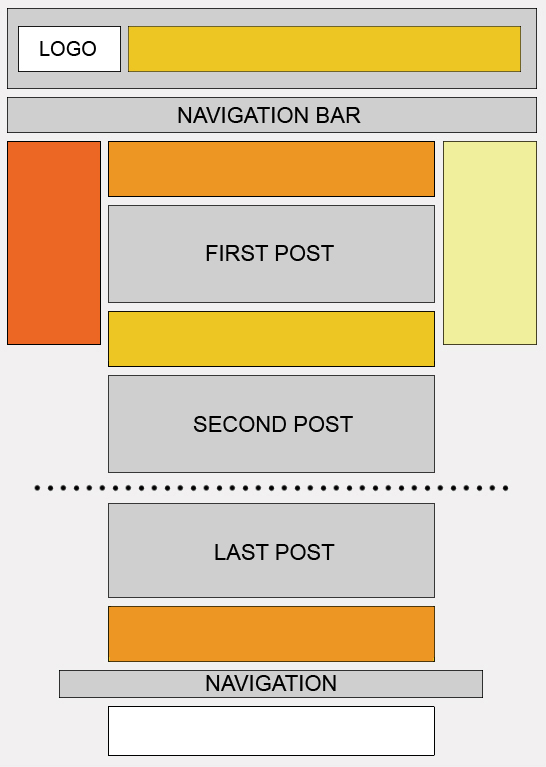
When you run a forum site, ad placement and formats are key to designing ads that will be successful but not intrusive to your regular users.


Map

Placement: Display your ad units where repeat users will notice them


  • Because forum regulars tend to skip the header and go straight to the meat of the thread, placing your ad unit above or below the first post can be more effective than ads next to the logo.


  • Place a leaderboard immediately after the last post. This provides users who make it to the end of a thread with a 'next step' when the content ends. Try to avoid placing it after the footer, though, as your readers will likely move to the next thread without seeing the ad.


Formats: Adapting your design for multiple ad units and limited space.


  • Using multiple ad units, you can use a variety of formats to fill ad space throughout your site. Placing a skyscraper above the fold on the left side of your forum seems to produce slightly better performance than other positioning. However, when using multiple ad units throughout the page our horizontal bias still favours the leaderboard. Our heat map provides more details.


  • Use horizontal link units, which are small enough to fit near the top of your forum just below the header. For the regular forum visitor, link units offer a wider range of relevant topics to browse.


However you choose to implement your ads, keep in mind that forums are highly interactive sites with regular users. Be sure to blend the ads nicely, so they do not appear overly intrusive, but do not blend them so well that they mislead your users! Every forum site is different and you know your community best, so as always use your own judgement to create the most positive experience for your users.


Tip for making the most of revenue opportunities: Like most sites, forums can benefit from opting in to image ads. Supporting image ads increases the pool of ads, particularly cost-per-thousand-impression (CPM) ads, bidding to display on your site. Since forums tend to have lower click-through rates than other types of sites, CPM ads can improve revenue without the need for clicks. Keep in mind, however, that CPM ads come in both text and image formats.

Tuesday, 18 December 2007

Tips to Join Google Adsense

Before you go and join Google Adsense, read this to improve your chances of getting accepted.


Google "screens" all websites, before they get accepted into the Google Adsense program. This is to ensure that your website complies with Google's Adsense terms. It has been argued by several people that the Adsense screening procedure consists of two steps:


  • Step1 : All new applications are screened by a Google robot "bot". It checks the content of your site, and the number of pages within your site, and a few other factors important to Google.

  • Step2 : If the "bot" gives an initial "ok" for your site, it is then quickly reviewed by a Google employee, that finally decides if your website can be accepted into the program.


You then receive a welcome e-mail from Google's Adsense team, and you are ready to start serving Google Adsense ads on your website.


In case that your website is not initially accepted into Google's Adsense program, don't despair!


You will be notified by Google's Adsense Team that your website cant be accepted into the program at the moment, including one or more reasons why. At this point you should closely watch the reasons stated, and make the necessary changes to your website, and then reply to the e-mail and ask for a re-evaluation.


Evaluation of your application usually takes from minutes and up to 48 hours.


Improve your chances of getting accepted into Google Adsense:


You can, and should, pay close attention to the following, and make sure that your website meets the following BEFORE applying to Google Adsense.


  • Make sure that your website has original content, which means your pages should contain valid information - not link farms!

  • Create 10-15 pages of content, each with different information about your websites subject.

  • Create title, meta tags, and headline "<H1> for each page.

  • Order a domain to hold your pages, free hosts are more unlikely to get accepted.

  • Make an easy to use navigation.

  • Include a sitemap on your website, that clearly identifies each page and a small paragraph on each page.

  • Include a contact, disclaimer, and privacy policy page on your site.

  • Make sure that your website doesn't include content that are not allowed by Google Adsense.

  • Don't serve other text bases ads (other adsense similar programs).


Pay close attention to Google's Adsense terms, and make sure that you understand it - then make changes to your site that you think might be in violation.


If you try to follow the above steps, you are likely to get accepted, even though we can't give you any guarantees!


Sunday, 16 December 2007

Reducing Holiday Financial Stress

Suzi McGarvey, extension associate, University of Missouri Extension
Reviewed by
Brenda Procter, M.S., State Specialist & Instructor
Personal Financial Planning, University of Missouri-Extension

With the holidays soon at hand, many people begin to feel the financial stress of the season. You can lessen the anxiety you may feel during this time of the year by planning purchases in advance. Consider the following tips for a more enjoyable holiday season:

  • Make a list of the people you will need to buy for and how much you plan on spending for each person.
  • Determine how much in total you plan on spending, and if this figure seems too high, make adjustments in your planned purchases.
  • Try to avoid the temptation of paying for all of your purchases with a credit card when you do not have the money to pay it off. Avoid thinking that you'll just "pay it off later." If you cannot afford a particular item, look for something similar but less expensive or search for an alternative present. Set a limit and try to stick to it.
  • Be wary with department store promotions. Offers of "buy now and pay later" sometimes have hidden clauses that allow interest to accrue until your first payment. Read through all paperwork before signing it, and do not be afraid to ask the store clerk questions regarding the promotion. Remember, if it sounds too good to be true, it probably is.
  • Be creative with your gifts. Try making homemade items or give personalized gifts offering your services for things such as an evening of free babysitting.
  • A donation to a local charity may make more of a lasting impression than a store-bought gift. Use money that you would have spent on friends and family to make one larger donation to one specific charity or give smaller donations to each family member' s favorite charity. Call local food pantries, shelters and charities to find out what they need during the busy holiday season.
  • If you're hosting a family dinner, ask others to bring a dish.
  • Pay attention to return policies for items you purchased.
  • Keep your receipts. If you need to return something later, having your receipt will speed up the process and you will have a better chance of getting your money back.
  • Shop alone. A tired spouse or child may encourage you to impulsively buy some items so they could get home sooner.
  • Avoid high pressure sales tactics. Know what you're looking for before you enter a store or tell the sales clerk that you are looking and will let them know if you need help with something.
  • Search through clearance racks for sale items. Shop at discount stores for gifts for children, neighbors, and co-workers.
  • Don't wait for the last minute to do your shopping. You may be more tempted to purchase higher priced items if you are in a hurry or don't have time to comparison shop. If you spread your shopping out over several weeks/months, you won't have to come up with so much money at once.
  • After the holiday season, start saving for the next one. Put aside a little each month or look for sale items through the year that could be saved for the holiday season.

Friday, 14 December 2007

Before you apply to AdSense

Getting started with AdSense is easy, but when reviewing the applications we get, we've noticed a few common pitfalls. To help make sure your application is approved the first time around, ask yourself the following questions below before submitting.

Do I have what I need to apply?
  • Website: To display Google ads, you need administrative access to the site you submit for AdSense in order to place our JavaScript ad code on your site. Adding the Google code to your site's source code will enable you to show ads, search boxes, and referral units on your pages.

    If you don't have a website of your own, that doesn't mean you can't participate in AdSense. We offer a couple of options to help you easily create your own site.

    First, there's Blogger, a free tool for setting up and publishing your own blog online. With its easy-to-use and customizable templates, you can create an account and start blogging right away. You can also set up AdSense ads easily through your Blogger account.

    If you prefer more flexibility and control, then our web page tool, Page Creator, may be more suitable. Signing up for a Page Creator account is free as well -- all you need is a Gmail account. The best part is that you don't have to download any software or hire a designer. Once you've created your Page Creator site, you can begin displaying Google ads in minutes.

  • Valid payee name: Payments will be made out to the name on your account, so make sure to include your full and valid name, or that of your business, rather than just initials. If banks won't accept the name you enter in the 'Payee Name' field, neither will we.

  • Valid address: We want to make sure your hard-earned money reaches you, so please also provide a complete valid address where you can receive mail. If you live in a country or territory that doesn't have a standard format for addresses, please be sure that your application includes as much information as a mailman would need to find your residence.
Does my website meet all the necessary requirements?
  • Valid URL: If you manage an entire website, give us the URL of your home page. If you manage a blog or other account within a larger website, you should provide the URL of the specific page that you manage and not the URL of the entire hosting website. Don't forget to double check your URL for typos!

  • Fully launched website: Since we won't be able to review websites that are not fully launched or built, please ensure that your site is live and functioning at the time you submit your application.

  • Unique content: We want visitors to sites in the AdSense network to have a good experience, so please publish content that's interesting and unique. Avoid using "doorway" pages created just for search engines, or other cookie cutter approaches such as affiliate programs with little or no original content. If you're participating in an affiliate program, give people a reason to visit your site first.

  • Supported language: We're constantly working to provide targeted, relevant ads in more languages. However, until then, we can only approve your application if the majority of your website is in one of our supported languages.

  • Pay-To Sites: If your site participates in programs that compensate people to perform activities that drive traffic to you, we can't approve your application. Some examples of these "pay-to" programs are sites that encourage users "to click" or "to surf" or "to read email." In addition, you shouldn't encourage others to join these programs in the content, links, or third-party ads on your site.
We also encourage you to read our program policies in detail for further insight on how to create a successful application. Now that you have all the necessary information, now's a good time to apply.
Showing posts with label tips. Show all posts

Wednesday, 23 January 2008

Benefits of market segmentation

There are a many benefits that can be resulting from segmenting a market:


  1. Segmentation is a useful approach to marketing for the smaller firms. It allows target markets to be matched to company competencies and makes it more achievable for the smaller firms to create a defensible niche in the market.

  2. It assists recognizing gaps in the market that are not served or under-served. These can provide areas for new product development or extension of the existing product or service range.

  3. In mature or declining markets it may be possible to identify particular segments that are still in growth. Focusing on growth segments when the overall market is declining is a major strategy in the latter stages of the product life cycle.

  4. Segmentation allows marketers to match a product or service to the needs of the target market.

Monday, 31 December 2007

Google Adsense in Blogger, and inline too

I have an article telling how to insert Google ad in blogger's post which involvels template change and my transform module. I have just discovered that there's a much more easy way to do this. What a pity I haven't seen it comming sooner.

Here's all you need to do:
  1. Log into your Blogger account at http://www.blogger.com .
  2. Visit your blog's Template tab and click on the Page Elements link.
  3. Click Edit in the Blog Posts section.


  4. Check the box next to Show Ads Between Posts. You can then select how often you'd like your ads to appear, such as once after every post or once after every other post.


  5. Customize the ads and click on Save Changes when you're done.
Please note that right now, it's only possible to insert Google ads using this widget, and not AdSense for search boxes or referral units.

For more detailed instructions, please visit Blogger's Help Center. Lastly, don't forget to check out our blog optimization tips for ways to improve your ad performance.

Easy huh? Link to this post to let your friends know. Happy new year! :)

Saturday, 29 December 2007

Making AdSense fit your forum site

When you run a forum site, ad placement and formats are key to designing ads that will be successful but not intrusive to your regular users.


Map

Placement: Display your ad units where repeat users will notice them


  • Because forum regulars tend to skip the header and go straight to the meat of the thread, placing your ad unit above or below the first post can be more effective than ads next to the logo.


  • Place a leaderboard immediately after the last post. This provides users who make it to the end of a thread with a 'next step' when the content ends. Try to avoid placing it after the footer, though, as your readers will likely move to the next thread without seeing the ad.


Formats: Adapting your design for multiple ad units and limited space.


  • Using multiple ad units, you can use a variety of formats to fill ad space throughout your site. Placing a skyscraper above the fold on the left side of your forum seems to produce slightly better performance than other positioning. However, when using multiple ad units throughout the page our horizontal bias still favours the leaderboard. Our heat map provides more details.


  • Use horizontal link units, which are small enough to fit near the top of your forum just below the header. For the regular forum visitor, link units offer a wider range of relevant topics to browse.


However you choose to implement your ads, keep in mind that forums are highly interactive sites with regular users. Be sure to blend the ads nicely, so they do not appear overly intrusive, but do not blend them so well that they mislead your users! Every forum site is different and you know your community best, so as always use your own judgement to create the most positive experience for your users.


Tip for making the most of revenue opportunities: Like most sites, forums can benefit from opting in to image ads. Supporting image ads increases the pool of ads, particularly cost-per-thousand-impression (CPM) ads, bidding to display on your site. Since forums tend to have lower click-through rates than other types of sites, CPM ads can improve revenue without the need for clicks. Keep in mind, however, that CPM ads come in both text and image formats.

Tuesday, 18 December 2007

Tips to Join Google Adsense

Before you go and join Google Adsense, read this to improve your chances of getting accepted.


Google "screens" all websites, before they get accepted into the Google Adsense program. This is to ensure that your website complies with Google's Adsense terms. It has been argued by several people that the Adsense screening procedure consists of two steps:


  • Step1 : All new applications are screened by a Google robot "bot". It checks the content of your site, and the number of pages within your site, and a few other factors important to Google.

  • Step2 : If the "bot" gives an initial "ok" for your site, it is then quickly reviewed by a Google employee, that finally decides if your website can be accepted into the program.


You then receive a welcome e-mail from Google's Adsense team, and you are ready to start serving Google Adsense ads on your website.


In case that your website is not initially accepted into Google's Adsense program, don't despair!


You will be notified by Google's Adsense Team that your website cant be accepted into the program at the moment, including one or more reasons why. At this point you should closely watch the reasons stated, and make the necessary changes to your website, and then reply to the e-mail and ask for a re-evaluation.


Evaluation of your application usually takes from minutes and up to 48 hours.


Improve your chances of getting accepted into Google Adsense:


You can, and should, pay close attention to the following, and make sure that your website meets the following BEFORE applying to Google Adsense.


  • Make sure that your website has original content, which means your pages should contain valid information - not link farms!

  • Create 10-15 pages of content, each with different information about your websites subject.

  • Create title, meta tags, and headline "<H1> for each page.

  • Order a domain to hold your pages, free hosts are more unlikely to get accepted.

  • Make an easy to use navigation.

  • Include a sitemap on your website, that clearly identifies each page and a small paragraph on each page.

  • Include a contact, disclaimer, and privacy policy page on your site.

  • Make sure that your website doesn't include content that are not allowed by Google Adsense.

  • Don't serve other text bases ads (other adsense similar programs).


Pay close attention to Google's Adsense terms, and make sure that you understand it - then make changes to your site that you think might be in violation.


If you try to follow the above steps, you are likely to get accepted, even though we can't give you any guarantees!


Sunday, 16 December 2007

Reducing Holiday Financial Stress

Suzi McGarvey, extension associate, University of Missouri Extension
Reviewed by
Brenda Procter, M.S., State Specialist & Instructor
Personal Financial Planning, University of Missouri-Extension

With the holidays soon at hand, many people begin to feel the financial stress of the season. You can lessen the anxiety you may feel during this time of the year by planning purchases in advance. Consider the following tips for a more enjoyable holiday season:

  • Make a list of the people you will need to buy for and how much you plan on spending for each person.
  • Determine how much in total you plan on spending, and if this figure seems too high, make adjustments in your planned purchases.
  • Try to avoid the temptation of paying for all of your purchases with a credit card when you do not have the money to pay it off. Avoid thinking that you'll just "pay it off later." If you cannot afford a particular item, look for something similar but less expensive or search for an alternative present. Set a limit and try to stick to it.
  • Be wary with department store promotions. Offers of "buy now and pay later" sometimes have hidden clauses that allow interest to accrue until your first payment. Read through all paperwork before signing it, and do not be afraid to ask the store clerk questions regarding the promotion. Remember, if it sounds too good to be true, it probably is.
  • Be creative with your gifts. Try making homemade items or give personalized gifts offering your services for things such as an evening of free babysitting.
  • A donation to a local charity may make more of a lasting impression than a store-bought gift. Use money that you would have spent on friends and family to make one larger donation to one specific charity or give smaller donations to each family member' s favorite charity. Call local food pantries, shelters and charities to find out what they need during the busy holiday season.
  • If you're hosting a family dinner, ask others to bring a dish.
  • Pay attention to return policies for items you purchased.
  • Keep your receipts. If you need to return something later, having your receipt will speed up the process and you will have a better chance of getting your money back.
  • Shop alone. A tired spouse or child may encourage you to impulsively buy some items so they could get home sooner.
  • Avoid high pressure sales tactics. Know what you're looking for before you enter a store or tell the sales clerk that you are looking and will let them know if you need help with something.
  • Search through clearance racks for sale items. Shop at discount stores for gifts for children, neighbors, and co-workers.
  • Don't wait for the last minute to do your shopping. You may be more tempted to purchase higher priced items if you are in a hurry or don't have time to comparison shop. If you spread your shopping out over several weeks/months, you won't have to come up with so much money at once.
  • After the holiday season, start saving for the next one. Put aside a little each month or look for sale items through the year that could be saved for the holiday season.

Friday, 14 December 2007

Before you apply to AdSense

Getting started with AdSense is easy, but when reviewing the applications we get, we've noticed a few common pitfalls. To help make sure your application is approved the first time around, ask yourself the following questions below before submitting.

Do I have what I need to apply?
  • Website: To display Google ads, you need administrative access to the site you submit for AdSense in order to place our JavaScript ad code on your site. Adding the Google code to your site's source code will enable you to show ads, search boxes, and referral units on your pages.

    If you don't have a website of your own, that doesn't mean you can't participate in AdSense. We offer a couple of options to help you easily create your own site.

    First, there's Blogger, a free tool for setting up and publishing your own blog online. With its easy-to-use and customizable templates, you can create an account and start blogging right away. You can also set up AdSense ads easily through your Blogger account.

    If you prefer more flexibility and control, then our web page tool, Page Creator, may be more suitable. Signing up for a Page Creator account is free as well -- all you need is a Gmail account. The best part is that you don't have to download any software or hire a designer. Once you've created your Page Creator site, you can begin displaying Google ads in minutes.

  • Valid payee name: Payments will be made out to the name on your account, so make sure to include your full and valid name, or that of your business, rather than just initials. If banks won't accept the name you enter in the 'Payee Name' field, neither will we.

  • Valid address: We want to make sure your hard-earned money reaches you, so please also provide a complete valid address where you can receive mail. If you live in a country or territory that doesn't have a standard format for addresses, please be sure that your application includes as much information as a mailman would need to find your residence.
Does my website meet all the necessary requirements?
  • Valid URL: If you manage an entire website, give us the URL of your home page. If you manage a blog or other account within a larger website, you should provide the URL of the specific page that you manage and not the URL of the entire hosting website. Don't forget to double check your URL for typos!

  • Fully launched website: Since we won't be able to review websites that are not fully launched or built, please ensure that your site is live and functioning at the time you submit your application.

  • Unique content: We want visitors to sites in the AdSense network to have a good experience, so please publish content that's interesting and unique. Avoid using "doorway" pages created just for search engines, or other cookie cutter approaches such as affiliate programs with little or no original content. If you're participating in an affiliate program, give people a reason to visit your site first.

  • Supported language: We're constantly working to provide targeted, relevant ads in more languages. However, until then, we can only approve your application if the majority of your website is in one of our supported languages.

  • Pay-To Sites: If your site participates in programs that compensate people to perform activities that drive traffic to you, we can't approve your application. Some examples of these "pay-to" programs are sites that encourage users "to click" or "to surf" or "to read email." In addition, you shouldn't encourage others to join these programs in the content, links, or third-party ads on your site.
We also encourage you to read our program policies in detail for further insight on how to create a successful application. Now that you have all the necessary information, now's a good time to apply.

Money making search

Google Custom Search