Showing posts with label blogspot. Show all posts

Friday, 4 January 2008

Optimise the ads on your blog

When working with a blog, you are facing some interesting ad implementation challenges: a predetermined page format, highly targeted content and regular visitors, among other things. To make the most of your readership and content, here are a few suggestions:


Blend ads into your blog


To increase the likelihood that your readers will see and click on your ads, blend your ad units into the background of your blog. Choose a bold colour for the ad title to help draw attention to your ads then make sure that the background and borders of your ads are the same colour as the background of the area where the ad is placed.

Map

Experiment with multiple ad formats and locations


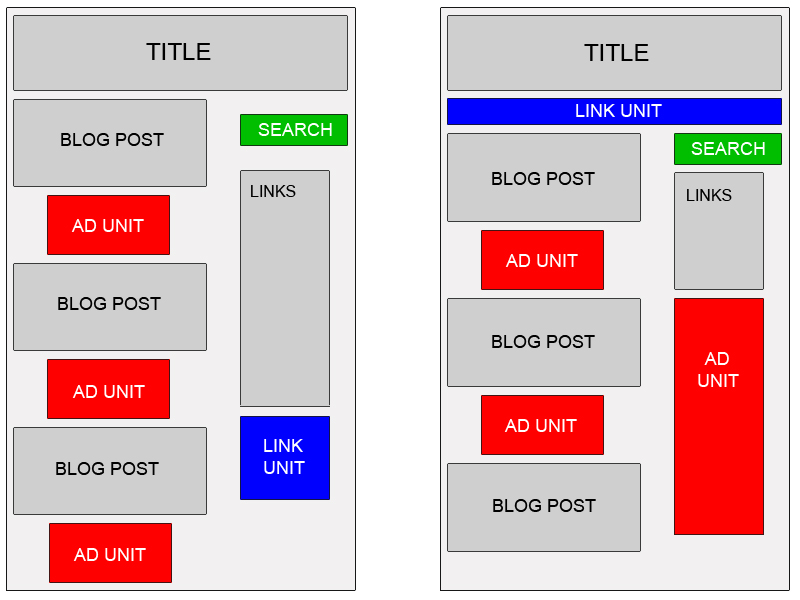
In general, wider ad formats tend to be more reader-friendly. Placing an ad unit after the first post will likely catch your readers' attention. Take a look at our sample implementations to get some ideas. In addition, consider placing a Skyscraper (120x600) or vertical link unit on the right side of your blog. If you are using Blogger, you can find instructions on placing AdSense code in your blog's sidebar.


Offer readers more options with search and referrals


To make sure that you are earning the most revenue possible with AdSense, go beyond just ads to use AdSense for search and referrals. You can increase your earnings, provide readers with valuable information and take advantage of flexible formats.


Improve ad targeting


With section targeting, you can target an ad unit to a specific section of your blog, as well as block out irrelevant sections like navigational links. We recommend that only those familiar with HTML attempt to implement section targeting.


Tip for generating more traffic to your blog: If you are a Blogger user, activate this setting to notify Weblogs.com, a blog update notification service, whenever you have updated your blog. That means that your blog will be included in various "recently updated" lists on the web as well as other blog-related services.

Monday, 31 December 2007

Google Adsense in Blogger, and inline too

I have an article telling how to insert Google ad in blogger's post which involvels template change and my transform module. I have just discovered that there's a much more easy way to do this. What a pity I haven't seen it comming sooner.

Here's all you need to do:
  1. Log into your Blogger account at http://www.blogger.com .
  2. Visit your blog's Template tab and click on the Page Elements link.
  3. Click Edit in the Blog Posts section.


  4. Check the box next to Show Ads Between Posts. You can then select how often you'd like your ads to appear, such as once after every post or once after every other post.


  5. Customize the ads and click on Save Changes when you're done.
Please note that right now, it's only possible to insert Google ads using this widget, and not AdSense for search boxes or referral units.

For more detailed instructions, please visit Blogger's Help Center. Lastly, don't forget to check out our blog optimization tips for ways to improve your ad performance.

Easy huh? Link to this post to let your friends know. Happy new year! :)

Sunday, 9 December 2007

How to Insert Google Ads in Blogger's Posts?

Inserting Adsense code into your post body helps you to increase your benefits from google Adsense and have higher (Click through rate).


Parse Your AdSense Code


Parse means making the Adsense code standarded XML and that is made by replacing all the html character such as ’<’ with ’>’ and ’"’ with ’"’. For example:


<script type="text/javascript"><!--
google_ad_client = "pub-XXXXXXXXXXXXXXX";
google_ad_width = 336;
google_ad_height = 280;
google_ad_format = "336x280_as";
google_ad_type = "text_image";
google_ad_channel = "";
google_color_border = "FFFFFF";
google_color_bg = "FFFFFF";
google_color_link = "000000";
google_color_text = "000000";
google_color_url = "000000";
//--></script>
<script type="text/javascript"
src="http://pagead2.googlesyndication.com/pagead/show_ads.js">
</script>

would be
<script type="text/javascript"><!--
google_ad_client = "pub-XXXXXXXXXXXXXXX";
google_ad_width = 336;
google_ad_height = 280;
google_ad_format = "336x280_as";
google_ad_type = "text_image";
google_ad_channel = "";
google_color_border = "FFFFFF";
google_color_bg = "FFFFFF";
google_color_link = "000000";
google_color_text = "000000";
google_color_url = "000000";
//--></script>
<script type="text/javascript"
src="http://pagead2.googlesyndication.com/pagead/show_ads.js">
</script>

You can use your text editor to replace all the HTML, but there is an easier free method to parse AdSense Code here, it takes care of everything for you ;) (Yeah, I made this tool myself)


Now with the code you can paste it anywhere in your HTML code with no error at all.


Where to paste the parsed HTML code?

Expand your blog’s widget first and find the code below,then add your parsed code and save the template :


1)Next To The Post :

[Image]


<div style="float:left;">
<!--parsed Adsense code-->
</div>


<div class=’post-body’>
<p><data:post.body/></p>
<div style=’clear: both;’/> <!-- clear for photos floats -->
</div>

2)After Post Before Credits:

ad3


<div class=’post-body’>
<p><data:post.body/></p>
<div style=’clear: both;’/> <!-- clear for photos floats -->
</div><div><!--parsed Adsense code--></div><div class=’post-footer’>
<p class=’post-footer-line post-footer-line-1’>
<span class=’post-author’>
<b:if cond=’data:top.showAuthor’>
<data:top.authorLabel/> <data:post.author/>

3)After Credits

ad2


<p class=’post-footer-line post-footer-line-3’/><div><!--parsed Adsense code--></div>
</div>
</div>
</b:includable>
</b:widget>
</b:section>


May this method violate Google Adsense TOS ?

Absolutely no,Minor edits on Google Adsense Code for Blogger Beta/XML are allowed as long as the resulting Adsense Code generated by Blogger is exactly the same as given from Google Adsense.

Showing posts with label blogspot. Show all posts

Friday, 4 January 2008

Optimise the ads on your blog

When working with a blog, you are facing some interesting ad implementation challenges: a predetermined page format, highly targeted content and regular visitors, among other things. To make the most of your readership and content, here are a few suggestions:


Blend ads into your blog


To increase the likelihood that your readers will see and click on your ads, blend your ad units into the background of your blog. Choose a bold colour for the ad title to help draw attention to your ads then make sure that the background and borders of your ads are the same colour as the background of the area where the ad is placed.


Map

Experiment with multiple ad formats and locations


In general, wider ad formats tend to be more reader-friendly. Placing an ad unit after the first post will likely catch your readers' attention. Take a look at our sample implementations to get some ideas. In addition, consider placing a Skyscraper (120x600) or vertical link unit on the right side of your blog. If you are using Blogger, you can find instructions on placing AdSense code in your blog's sidebar.


Offer readers more options with search and referrals


To make sure that you are earning the most revenue possible with AdSense, go beyond just ads to use AdSense for search and referrals. You can increase your earnings, provide readers with valuable information and take advantage of flexible formats.


Improve ad targeting


With section targeting, you can target an ad unit to a specific section of your blog, as well as block out irrelevant sections like navigational links. We recommend that only those familiar with HTML attempt to implement section targeting.


Tip for generating more traffic to your blog: If you are a Blogger user, activate this setting to notify Weblogs.com, a blog update notification service, whenever you have updated your blog. That means that your blog will be included in various "recently updated" lists on the web as well as other blog-related services.

Monday, 31 December 2007

Google Adsense in Blogger, and inline too

I have an article telling how to insert Google ad in blogger's post which involvels template change and my transform module. I have just discovered that there's a much more easy way to do this. What a pity I haven't seen it comming sooner.

Here's all you need to do:
  1. Log into your Blogger account at http://www.blogger.com .
  2. Visit your blog's Template tab and click on the Page Elements link.
  3. Click Edit in the Blog Posts section.


  4. Check the box next to Show Ads Between Posts. You can then select how often you'd like your ads to appear, such as once after every post or once after every other post.


  5. Customize the ads and click on Save Changes when you're done.
Please note that right now, it's only possible to insert Google ads using this widget, and not AdSense for search boxes or referral units.

For more detailed instructions, please visit Blogger's Help Center. Lastly, don't forget to check out our blog optimization tips for ways to improve your ad performance.

Easy huh? Link to this post to let your friends know. Happy new year! :)

Sunday, 9 December 2007

How to Insert Google Ads in Blogger's Posts?

Inserting Adsense code into your post body helps you to increase your benefits from google Adsense and have higher (Click through rate).


Parse Your AdSense Code


Parse means making the Adsense code standarded XML and that is made by replacing all the html character such as ’<’ with ’>’ and ’"’ with ’"’. For example:


<script type="text/javascript"><!--
google_ad_client = "pub-XXXXXXXXXXXXXXX";
google_ad_width = 336;
google_ad_height = 280;
google_ad_format = "336x280_as";
google_ad_type = "text_image";
google_ad_channel = "";
google_color_border = "FFFFFF";
google_color_bg = "FFFFFF";
google_color_link = "000000";
google_color_text = "000000";
google_color_url = "000000";
//--></script>
<script type="text/javascript"
src="http://pagead2.googlesyndication.com/pagead/show_ads.js">
</script>

would be
<script type="text/javascript"><!--
google_ad_client = "pub-XXXXXXXXXXXXXXX";
google_ad_width = 336;
google_ad_height = 280;
google_ad_format = "336x280_as";
google_ad_type = "text_image";
google_ad_channel = "";
google_color_border = "FFFFFF";
google_color_bg = "FFFFFF";
google_color_link = "000000";
google_color_text = "000000";
google_color_url = "000000";
//--></script>
<script type="text/javascript"
src="http://pagead2.googlesyndication.com/pagead/show_ads.js">
</script>

You can use your text editor to replace all the HTML, but there is an easier free method to parse AdSense Code here, it takes care of everything for you ;) (Yeah, I made this tool myself)


Now with the code you can paste it anywhere in your HTML code with no error at all.


Where to paste the parsed HTML code?

Expand your blog’s widget first and find the code below,then add your parsed code and save the template :


1)Next To The Post :

[Image]


<div style="float:left;">
<!--parsed Adsense code-->
</div>


<div class=’post-body’>
<p><data:post.body/></p>
<div style=’clear: both;’/> <!-- clear for photos floats -->
</div>

2)After Post Before Credits:

ad3


<div class=’post-body’>
<p><data:post.body/></p>
<div style=’clear: both;’/> <!-- clear for photos floats -->
</div><div><!--parsed Adsense code--></div><div class=’post-footer’>
<p class=’post-footer-line post-footer-line-1’>
<span class=’post-author’>
<b:if cond=’data:top.showAuthor’>
<data:top.authorLabel/> <data:post.author/>

3)After Credits

ad2


<p class=’post-footer-line post-footer-line-3’/><div><!--parsed Adsense code--></div>
</div>
</div>
</b:includable>
</b:widget>
</b:section>


May this method violate Google Adsense TOS ?

Absolutely no,Minor edits on Google Adsense Code for Blogger Beta/XML are allowed as long as the resulting Adsense Code generated by Blogger is exactly the same as given from Google Adsense.

Money making search

Google Custom Search