Showing posts with label ad. Show all posts

Tuesday, 8 January 2008

Few Minutes to Succeed With PPC Advertising

Your ads should be designed to allure the searcher, but be cautious that if you create ads that are too inviting you can rack up your click-through rate. Make sure that your ads relate specifically to the keywords they are associated with and make sure your message is clear. When a true potential customer views one of your ads you want that person to say "Wow, that's exactly what I am looking for." Try pointing web surfers to landing or gateway pages that are tailored to specific advertisements. Clear communication of your value proposition is the key.

5 Minutes to Succeed With Banner Ads

Make sure your banner ad is quick to load. Try to keep your banner ad size 5K. Keep it simple! Do not incorporate too much text or animation or too many colors and fonts. Make sure your banner ad is easily viewed. Be careful in your choice of font, font size and color. Always use alt tags. Make sure your banner ad links to the optimum page in your site. If you are using animated banner ads, limit your ads to 2-4 frames. Always include a call to action such as "Click here." Test your banner ads with different browsers.


Monday, 31 December 2007

Google Adsense in Blogger, and inline too

I have an article telling how to insert Google ad in blogger's post which involvels template change and my transform module. I have just discovered that there's a much more easy way to do this. What a pity I haven't seen it comming sooner.

Here's all you need to do:
  1. Log into your Blogger account at http://www.blogger.com .
  2. Visit your blog's Template tab and click on the Page Elements link.
  3. Click Edit in the Blog Posts section.


  4. Check the box next to Show Ads Between Posts. You can then select how often you'd like your ads to appear, such as once after every post or once after every other post.


  5. Customize the ads and click on Save Changes when you're done.
Please note that right now, it's only possible to insert Google ads using this widget, and not AdSense for search boxes or referral units.

For more detailed instructions, please visit Blogger's Help Center. Lastly, don't forget to check out our blog optimization tips for ways to improve your ad performance.

Easy huh? Link to this post to let your friends know. Happy new year! :)

Saturday, 29 December 2007

Making AdSense fit your forum site

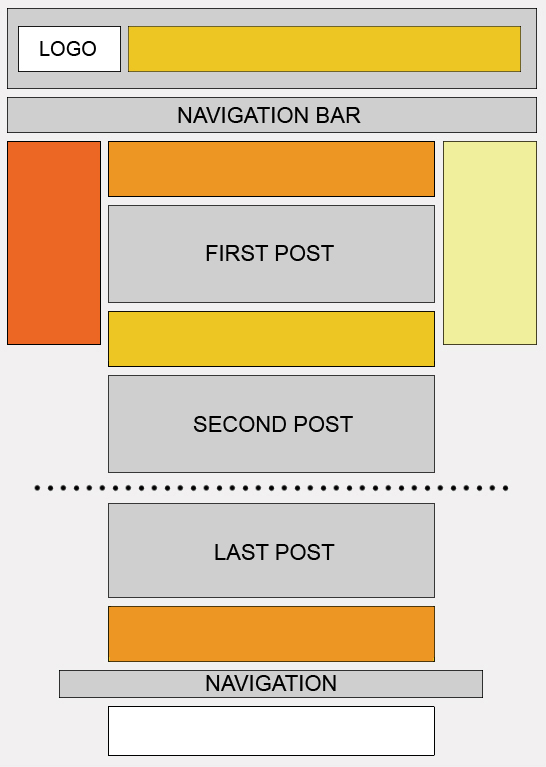
When you run a forum site, ad placement and formats are key to designing ads that will be successful but not intrusive to your regular users.


Map

Placement: Display your ad units where repeat users will notice them


  • Because forum regulars tend to skip the header and go straight to the meat of the thread, placing your ad unit above or below the first post can be more effective than ads next to the logo.


  • Place a leaderboard immediately after the last post. This provides users who make it to the end of a thread with a 'next step' when the content ends. Try to avoid placing it after the footer, though, as your readers will likely move to the next thread without seeing the ad.


Formats: Adapting your design for multiple ad units and limited space.


  • Using multiple ad units, you can use a variety of formats to fill ad space throughout your site. Placing a skyscraper above the fold on the left side of your forum seems to produce slightly better performance than other positioning. However, when using multiple ad units throughout the page our horizontal bias still favours the leaderboard. Our heat map provides more details.


  • Use horizontal link units, which are small enough to fit near the top of your forum just below the header. For the regular forum visitor, link units offer a wider range of relevant topics to browse.


However you choose to implement your ads, keep in mind that forums are highly interactive sites with regular users. Be sure to blend the ads nicely, so they do not appear overly intrusive, but do not blend them so well that they mislead your users! Every forum site is different and you know your community best, so as always use your own judgement to create the most positive experience for your users.


Tip for making the most of revenue opportunities: Like most sites, forums can benefit from opting in to image ads. Supporting image ads increases the pool of ads, particularly cost-per-thousand-impression (CPM) ads, bidding to display on your site. Since forums tend to have lower click-through rates than other types of sites, CPM ads can improve revenue without the need for clicks. Keep in mind, however, that CPM ads come in both text and image formats.

Showing posts with label ad. Show all posts

Tuesday, 8 January 2008

Few Minutes to Succeed With PPC Advertising

Your ads should be designed to allure the searcher, but be cautious that if you create ads that are too inviting you can rack up your click-through rate. Make sure that your ads relate specifically to the keywords they are associated with and make sure your message is clear. When a true potential customer views one of your ads you want that person to say "Wow, that's exactly what I am looking for." Try pointing web surfers to landing or gateway pages that are tailored to specific advertisements. Clear communication of your value proposition is the key.

5 Minutes to Succeed With Banner Ads

Make sure your banner ad is quick to load. Try to keep your banner ad size 5K. Keep it simple! Do not incorporate too much text or animation or too many colors and fonts. Make sure your banner ad is easily viewed. Be careful in your choice of font, font size and color. Always use alt tags. Make sure your banner ad links to the optimum page in your site. If you are using animated banner ads, limit your ads to 2-4 frames. Always include a call to action such as "Click here." Test your banner ads with different browsers.


Monday, 31 December 2007

Google Adsense in Blogger, and inline too

I have an article telling how to insert Google ad in blogger's post which involvels template change and my transform module. I have just discovered that there's a much more easy way to do this. What a pity I haven't seen it comming sooner.

Here's all you need to do:
  1. Log into your Blogger account at http://www.blogger.com .
  2. Visit your blog's Template tab and click on the Page Elements link.
  3. Click Edit in the Blog Posts section.


  4. Check the box next to Show Ads Between Posts. You can then select how often you'd like your ads to appear, such as once after every post or once after every other post.


  5. Customize the ads and click on Save Changes when you're done.
Please note that right now, it's only possible to insert Google ads using this widget, and not AdSense for search boxes or referral units.

For more detailed instructions, please visit Blogger's Help Center. Lastly, don't forget to check out our blog optimization tips for ways to improve your ad performance.

Easy huh? Link to this post to let your friends know. Happy new year! :)

Saturday, 29 December 2007

Making AdSense fit your forum site

When you run a forum site, ad placement and formats are key to designing ads that will be successful but not intrusive to your regular users.


Map

Placement: Display your ad units where repeat users will notice them


  • Because forum regulars tend to skip the header and go straight to the meat of the thread, placing your ad unit above or below the first post can be more effective than ads next to the logo.


  • Place a leaderboard immediately after the last post. This provides users who make it to the end of a thread with a 'next step' when the content ends. Try to avoid placing it after the footer, though, as your readers will likely move to the next thread without seeing the ad.


Formats: Adapting your design for multiple ad units and limited space.


  • Using multiple ad units, you can use a variety of formats to fill ad space throughout your site. Placing a skyscraper above the fold on the left side of your forum seems to produce slightly better performance than other positioning. However, when using multiple ad units throughout the page our horizontal bias still favours the leaderboard. Our heat map provides more details.


  • Use horizontal link units, which are small enough to fit near the top of your forum just below the header. For the regular forum visitor, link units offer a wider range of relevant topics to browse.


However you choose to implement your ads, keep in mind that forums are highly interactive sites with regular users. Be sure to blend the ads nicely, so they do not appear overly intrusive, but do not blend them so well that they mislead your users! Every forum site is different and you know your community best, so as always use your own judgement to create the most positive experience for your users.


Tip for making the most of revenue opportunities: Like most sites, forums can benefit from opting in to image ads. Supporting image ads increases the pool of ads, particularly cost-per-thousand-impression (CPM) ads, bidding to display on your site. Since forums tend to have lower click-through rates than other types of sites, CPM ads can improve revenue without the need for clicks. Keep in mind, however, that CPM ads come in both text and image formats.

Money making search

Google Custom Search